 한국어
 Bahasa Indonesia
 ไทย
 中文 (中国)
 Tiếng Việt
A designer sees “input voltage: 40 V” in a regulator’s datasheet and puts the part on a 36 V rail. A buyer compares two MOSFETs by the first table in each datasheet and decides they are equivalent. Both have read the absolute maximum ratings as if they described how the part works. They do not, and the difference matters whenever you design a circuit, approve an alternate or judge a quotation for a “compatible” part.
Three tables, three jobs
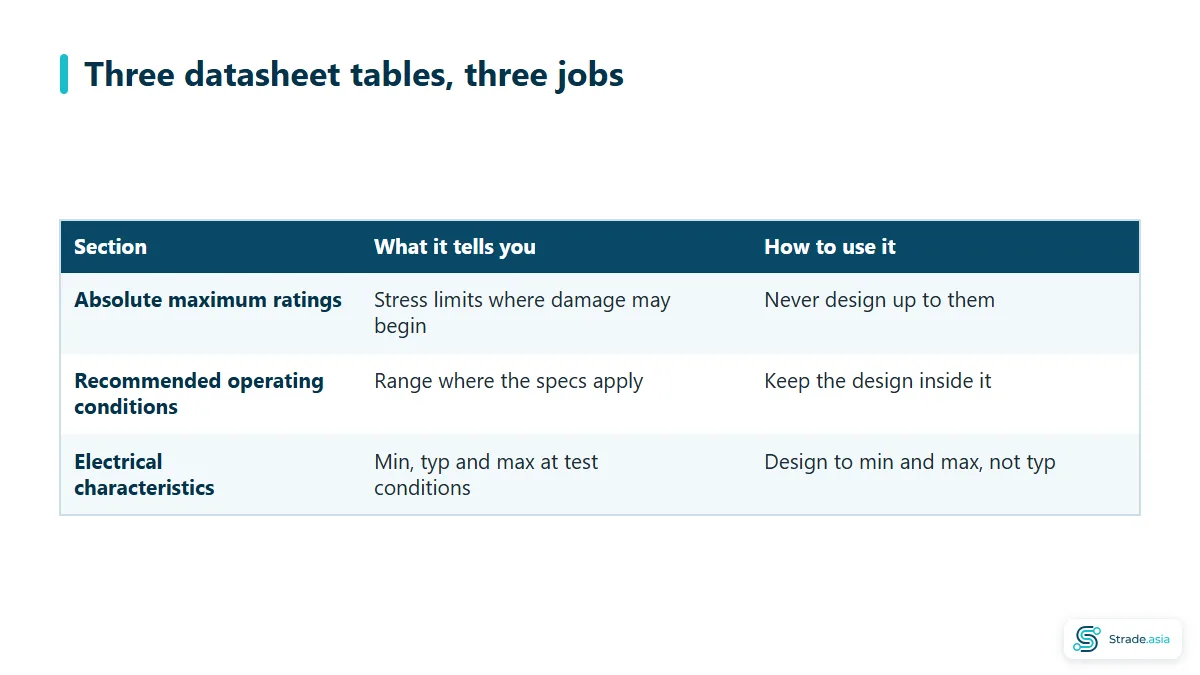
Absolute maximum ratings
These are stress limits. The note under the table usually says that stresses beyond these values may cause permanent damage, that they are stress ratings only, and that operation at these values is not implied. Exposure at the limits for long periods can also reduce reliability. Typical entries include supply and input voltages, output current, power dissipation, junction and storage temperature, and ESD ratings under the human body model (HBM) and charged device model (CDM).
Treat this table as a ceiling that must never be crossed, including during transients: inductive kicks, mains surges, hot-plugging and overshoot at power-up. A circuit that reaches an absolute maximum rating under worst-case conditions has a design fault, even if it works on the bench.
Recommended operating conditions
This table gives the range in which the maker says the part works as specified: supply voltage, ambient or junction temperature, input levels, load. Design so that the part stays inside this range in all conditions, including supply tolerance and the hottest corner of the enclosure.
Electrical characteristics
These are the values the maker guarantees or expects under stated test conditions. Read three things:
- Min, typ and max. Minimum and maximum values are guaranteed, by production test or by design and characterisation, which footnotes often state. Typical values are not guaranteed; they describe a typical unit under typical conditions. Design to min and max.
- Test conditions. Each line or table header states conditions such as supply voltage, load, frequency and temperature, often 25 °C. A value at 25 °C can be very different at the top of the temperature range. Many datasheets mark lines that apply over the full range with a symbol or bold type.
- Graphs. Typical performance curves help you understand behaviour, but they are not guaranteed either.
Derating: the margin between
Good practice leaves a margin between the worst-case stress in your circuit and the absolute maximum rating. Many companies set derating rules for voltage, current, power and temperature, especially for power semiconductors and capacitors. Power dissipation also depends on your board: thermal resistance figures such as junction-to-ambient are measured on standard test boards and may not match your layout, so measure temperatures in the real product.
Other sections worth reading
- Revision history and status. Check that you have the latest revision. Datasheets marked “advance information” or “preliminary” can change before release. After a merger, datasheets are reissued under the new brand, as we noted in what semiconductor mergers mean for your BOM; compare the content, not just the logo.
- Ordering information. One base part number often covers several variants. Suffixes mark the package, temperature grade, packing (tape and reel or tube), lead finish and sometimes the silicon version. Two parts with the same base number can have different ratings, so quote and buy the full ordering code. A cheaper or faster quote on the same base number may be for a narrower temperature grade, a different finish or packing that does not suit your line.
- Package and handling. Package drawings, the recommended land pattern, reflow profile and moisture sensitivity level, which governs storage as described in our guide to MSL, floor life and baking.
Comparing alternates
When the original part is not available, perhaps after a disruption like the Kumamoto earthquakes, do not stop at distributor parametric filters or the summary on the first page of the datasheet, which often mix limits with typical values at 25 °C. Compare candidates table by table:
- Absolute maximum ratings at least as wide as the original at both ends, including lower limits such as minimum storage temperature or negative pin voltage.
- Recommended operating range that covers your conditions.
- Key electrical characteristics compared as guaranteed min and max at the same test conditions, not as typical values.
- Package, pinout, thermal pad and land pattern.
- Full ordering code, including temperature grade and packing.
- A written list of every difference, for engineering approval.
How Strade can help
Strade is an independent electronic component distributor with its own engineers, supplying factories in Vietnam and across Asia. When a part is short or discontinued, our engineers compare datasheets line by line and propose alternates with matching specifications, and your team decides. See our semiconductor range.
Send us your BOM or the part numbers in question and we will check availability and alternates.